


Graph functions, solve equations, work with matrices, and run statistics — just like the real device.
Click the keys or type on your keyboard — it works just like the real TI-84 Plus CE.
New to the TI-84? Read the complete TI-84 emulator guide.
Try each problem on the calculator above as you read. The key presses are the same ones your teacher shows in class.
Find the roots of x² − 2x − 8 = 0 by graphing.
Answer: x = −2 and x = 4.
Find the intersection of y = 2x + 1 and y = −x + 7.
Answer: the lines meet at (2, 5).
Find 1-Var Stats for the data 4, 8, 6, 5, 7.
Answer: x̄ = 6, Sx ≈ 1.58, σx ≈ 1.41.
The calculator above follows the TI-84 Plus CE. If your class uses an older model, the keys and menus are almost the same, so the steps on this page still work.
| Feature | TI-84 Plus CE | TI-84 Plus | TI-83 |
|---|---|---|---|
| Released | 2015 | 2004 | 1996 |
| Screen | Color, 320 × 240 pixels | Black and white, 96 × 64 | Black and white, 96 × 64 |
| Power | Rechargeable battery | 4 AAA batteries | 4 AAA batteries |
| Computer link | USB | USB and link port | Link port only |
| Programming | TI-BASIC (Python on the Python edition) | TI-BASIC | TI-BASIC |
| Allowed on SAT and ACT | Yes | Yes | Yes |
The fastest way to do the jobs students need most. Keep this table open while you practice.
| Task | Keys to press |
|---|---|
| Graph a function | Y= → type the function → GRAPH |
| Standard window | ZOOM → 6: ZStandard |
| Trace a graph | TRACE → arrow keys to move along the curve |
| Find a zero (x-intercept) | 2nd TRACE → 2: zero → left bound → right bound → ENTER |
| Maximum or minimum | 2nd TRACE → 4: maximum or 3: minimum → bounds as above |
| Intersection of two graphs | 2nd TRACE → 5: intersect → ENTER → ENTER → ENTER |
| Table of values | 2nd GRAPH (TABLE); set start and step with 2nd WINDOW (TBLSET) |
| Mean, median, quartiles | STAT → 1: Edit (enter data) → STAT → CALC → 1: 1-Var Stats |
| Line of best fit | STAT → CALC → 4: LinReg(ax+b) |
| Matrix operations | 2nd x⁻¹ (MATRIX) → EDIT to enter, MATH for det, inverse, rref |
| Fraction answer | MATH → 1: ►Frac |
| Degrees or radians | MODE → DEGREE or RADIAN → ENTER |
Homework, exam practice and checking answers — with the same keys used in class, so nothing has to be relearned.
Project worked examples in class or in online lessons, so every student can follow the same steps.
Help with homework step by step, using the same buttons their child sees in school.
Quick calculations and statistics without installing software — for anyone who learned on a TI calculator.
Pick a calculator below — each one runs instantly in your browser with the full manual and tutorials included.
Use the TI-83 Plus calculator online for free. Full graphing calculator emulator in your browser — graph functions, statistics, and more. No download needed.
Open calculator →Complete TI-89 calculator guide: CAS symbolic math, 3D graphing, calculus tools, and step-by-step instructions for every key function. Free guide with FAQs.
Open calculator →Ask any math question and get a step-by-step AI solution — algebra, calculus, geometry, statistics and more. Free, no signup, 10 solves a day.
Open calculator →Run a real TI-84 Plus CE emulator online — full keypad, menus, graphing, statistics and programming, plus a complete guide to every key, menu and error fix.
Open calculator →Use the TI-30XS Calculator to solve math problems instantly. Get accurate scientific calculations, fractions, functions, and conversions on any device free.
Open calculator →Try a free online graphing calculator to graph functions, solve math problems, and analyze equations easily. Fast, accurate, and accessible on all devices.
Open calculator →A physical TI-84 costs over $100. Ours is free forever — no hidden charges, no premium tier.
No downloads or installs. Open the page and start calculating in seconds, on any device.
The same interface, buttons, and menus as the physical calculator — plus step-by-step tutorials.
An online TI-84 calculator is a digital version of the TI-84 Plus graphing calculator that works directly in your web browser. It has the same interface, buttons, menus, and functions of the real device so you can perform:
Our goal is to give you the full power of a TI-84 Plus calculator online, without any cost or hardware required.
Using the calculator is simple. Here’s the step-by-step process:
Just visit the page, and the emulator loads automatically.
All the main keys are included:
Y=
Window
Zoom
Trace
Graph
2nd & Alpha functions
STAT
MATH
MATRIX
MODE
You can calculate the following, including but not limited to:
Algebraic expressions
Square roots
Fractions
Exponents
Logs
Trigonometric functions
Probability commands
Hit the Enter button, and the results appear instantly. It uses the same formatting as the physical calculator.
Everything works the same as a real TI-84 graphing calculator. If you’re working with graphs:
Press Y= and enter one or more functions
Adjust settings in the WINDOW
Press GRAPH
Use TRACE to inspect values
Below are the most commonly used features included in the online TI-84, with simple explanations.
You can graph the following functions:
Linear functions (y = mx + b)
Quadratic functions
Polynomial functions
Trigonometric functions
Exponential functions
Piecewise-style equations (manually entered)
The following tools are included for graphing functions:
Trace
Zoom In / Zoom Out
Zoom Standard
Table mode
The TI-84 online supports all standard operations:
|
Fractions |
Natural log (ln) |
|
Exponents |
Scientific notation |
|
Square roots |
Factorials |
|
nth roots |
Absolute value |
|
Logarithms |
Conversion commands |
You can calculate all trigonometric functions such as:
sin, cos, tan
inverse trig functions
radian/degree mode
angle conversions
The STAT menu allows:
|
Data lists |
|
One-variable statistics |
|
Two-variable statistics |
|
Regressions (linear, quadratic, etc.) |
|
Histograms |
|
Box plots |
|
Scatter plots |
In the MATRIX and LIST menus, you can:
Create and edit matrices with custom values.
Perform matrix multiplication between any matrices.
Find determinants with ease.
Work with sequences and series.
Store values in the variables and use them.
Students in algebra, linear algebra, and computer science frequently use these tools.
The online TI 84 includes the Equation Solver, which can solve the following equations:
Linear equations
Quadratic equations
Polynomial equations
Systems (via matrices)
Enter:
(-b + √(b² - 4ac)) / (2a)
and
(-b - √(b² - 4ac)) / (2a)
Press Y=, enter:
Y1 = ax^2 + bx + c
Press 2nd → CALC → Intersect
Useful for finance and economics.
Example:
sin(45) or tan(30)
Determinant
Inverse
Row operations
People choose the online TI 84 for several reasons:
A physical TI-84 graphing calculator can be expensive, making the online TI-84 Calculator a free and convenient alternative.
As long as you have a browser, you can use the ti84 with no setup. Our tool works on all devices. You can use it on:
Windows
Mac
Chromebook
Linux
iPhone
iPad
Android devices
Our calculator's interface matches the real calculator, so students can practice before exams, learn menu navigation, understand graphing functions, and complete assignments faster.
The calculator looks and behaves exactly like a TI-84 Plus, making it easy for students and teachers to switch between real and online versions.
No installation needed to do calculations.
Always up and available for users.
Handles all levels of math and statistics calculations.
Great for algebra, geometry, calculus, physics, chemistry, and engineering.
Simple enough for beginners and powerful enough for advanced users.
Read our blog to learn how to use the TI-84 calculator online.

Date: 09/28/2026
Learn how to use a TI-84 calculator with this complete beginner's guide covering the interface, calculations, graphing, and essential settings.
Read More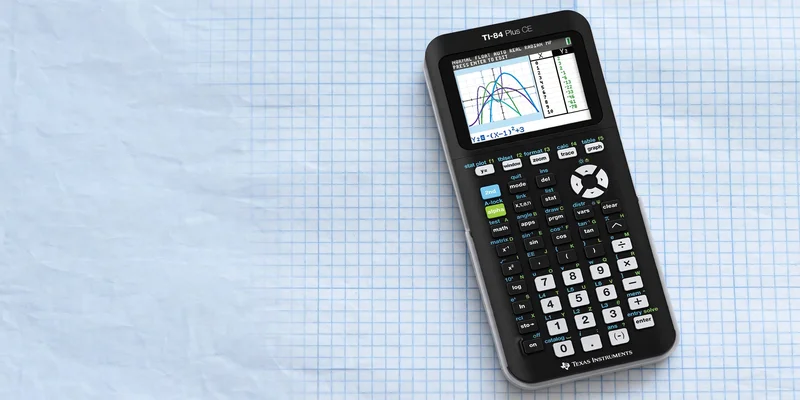
Date: 09/28/2026
Using a TI-84 calculator can be very helpful for graphing functions. However, it can be difficult to know which buttons to press and which options to choose. In...
Read More
Date: 09/28/2026
Statistics can be simplified using the best graphing calculator. The functions include analyzing data, statistics, regression, and graphs. You can also use a TI...
Read MoreYes — every calculator on this site is 100% free to use. No signup, no download, no time limits, and no premium version.
No. All calculators run directly in your web browser on phones, tablets, laptops, and desktops.
The emulator recreates the TI-84 Plus CE interface, buttons, and menus so you can practice exactly as you would on the physical device. Learn more on our TI-84 calculator page.
Visit our TI calculator blog for step-by-step tutorials on graphing, statistics, matrices, probability, and more.
Yes. You can enter several functions in the Y= menu (Y1, Y2, Y3, etc.). When you press GRAPH, the calculator will display all of them on the same coordinate plane. This is especially useful for comparing equations, analyzing intersections, and visualizing relationships between functions.
Absolutely. The STAT menu works exactly like the physical TI84. You can enter lists, run one-variable or two-variable stats, and perform regressions such as linear, quadratic, exponential, and power regression. The results are identical to a real TI-84 Plus.
Some browser versions allow you to right-click and save the canvas or take a screenshot. While the emulator itself does not have a built-in “save graph” button, you can easily capture your graph using your device’s screenshot tool.
Yes. The TABLE and TBLSET functions work exactly like on the real calculator. You can set the starting value, the increment, and view x- and y-values for any function entered in the Y= menu. This is very helpful for homework and function analysis.
Yes. You can switch between Degree and Radian modes in the MODE menu. Trigonometric functions will then calculate results according to the mode you selected.
Yes. The MATRIX menu supports creating, editing, and performing all of these matrix operations.
Yes. It allows solving linear, quadratic, polynomial, and trigonometric equations. You can use:
The Equation Solver is under the MATH menu.
Graph → CALC → Intersect for roots.
Numeric solve methods via custom expressions.
While the TI-84 doesn’t support an official “piecewise” input, you can graph functions piecewise by entering multiple conditions using the inequality and logic features. The online version supports this the same way the physical calculator does.
Yes. The STO→ key works normally. You can store values to variables (A, B, C, etc.) and recall them whenever needed, just like on a real TI-84 Plus.
Yes. Under MATH ⇒ PRB, you can use:
nPr
nCr
! (factorial)
random integers
random decimals
Yes, our online TI-84 emulator supports MathPrint formatting for fractions, exponents, roots, logs, summations, and integrals.
Yes. The calculator supports:
Numerical derivative (nderiv)
Numerical integral (fnInt)
These tools work under the MATH menu and operate just like the physical one.
No. Online calculators are usually not permitted during official exams. You can use it for studying, practicing menus, learning TI-84 navigation before the exam, and completing homework efficiently.
Yes. You can enter data into L1, L2, L3, etc., and generate scatter plots, histograms, box plots, and regression equations. All list-based graphing tools are available in our tool.
Most online TI-84 tools include a “reset” or “reload” option. If something becomes unresponsive, simply refresh the browser tab. The calculator reloads instantly with default settings.
Open the free TI-84 emulator and follow our complete manual to master every feature.
Launch the TI-84 CalculatorWhat We Are?
TI-84 Calculator Online, along with the TI-83 Plus, TI-89 CAS graphing calculator, online graphing calculator and TI-30XS scientific calculator, provides students with versatile digital tools for solving equations, plotting graphs, and handling complex math problems. These calculators can be used directly in any browser without installation, making them perfect for math and science students looking for quick and easy solutions.


TI-84, TI-83, TI-89, and TI-30XS are trademarks of Texas Instruments Incorporated. This is an independent website and is not affiliated with, sponsored, or endorsed by Texas Instruments.
© 2026 — Revision. All Rights Reserved.